Volume Former
The Volume Former is an automated volume envelope controlled by a beat-synchronized or free-running LFO. For the volume control you can alternatively manipulate the volume level (VCA) or use a low pass (LPG) or high pass gate (HPG). With the Volume Former you can create a Tremolo effect, transform pads into pumping chords (for hosts that doesn't support side-chaining) or accentuate rhythmical aspects of a drum loop, like isolating the kick drum. Just try the presets to get the idea!
Trigger LFO
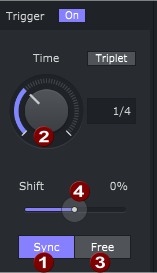
The Trigger LFO (low frequency oscillator) periodically triggers the envelope. So, for instance, set the time to 1/4 to trigger the envelope every beat.
|
When Sync(1) is active the trigger frequency is set dependent from the host tempo and you can chose a Time(2) between 1/1 (whole note or once a measure with a 4/4 beat) and 1/64 note (a quite fast stutter effect). The envelope tempo and phase always follows the host tempo and beat position. When Free(3) is active, you can set a trigger frequency between 0.2 and 25 Hz. This is independent of the host tempo and also of the playback position. The trigger oscillator is free running, i.e. it runs as soon as the plugin is loaded and the actual trigger time is more or less random. NOTE Some hosts may reset the LFO on playback start due to technical reasons. |
The Time value for the Sync and Free modes are independent parameters. If you switch from one mode to the other and change the time there, the value is retained in the other mode and is active again when you switch modes again.
Move the Phase of the LFO with the Shift value (4). You can shift the starting point of the envelope from -50% to +50% of the selected time.
Manual trigger: For more complex rhythms, you can switch the LFO trigger off with the Trigger switch  and assign a parameter automation to the Manual Trigger parameter in your host.
Envelope
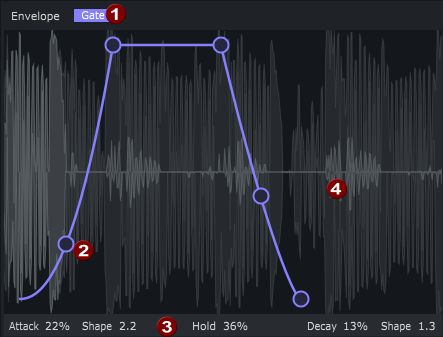
The envelope is a AHD envelope, thus consisting of three phases Attack, Hold and Decay. The envelope can be used in Gate or Pump (1) mode:
-
In Gate mode the Envelope rises the volume over the attack time, keeps it at maximum level for the hold time and lowers it over the decay time.
-
In Pump mode the envelope is mirrored horizontally and works vice versa: starting from maximum level, it fells to zero over the attack time, stays there for the hold time and rises back to maximum over the decay time.
(2)Adjust the time spans and curve shapes by dragging the circular handles at the envelope. Below the graphic there's also a numeric readout of the values (3). You set the time spans in percent of the whole LFO cycle.
NOTE You'll notice, that the values don't have to add up to 100%. That means, you can set envelopes that are longer or shorter than the LFO cycle. By this you can use only the parts of the envelopes or open/close the gate for just a part of the LFO cycle.
(4) You can see the effect of the Volume Former on the volume directly in the waveform display, that runs through behind the envelope.
Gate
|
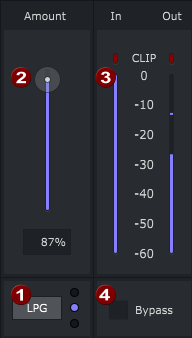
Use the gate type switch (1) to select between VCA, LPG and HPG.
|
The low-pass gate comes from "West Coast Style" synthesizer design and works differently than a simple volume control: volume reduction is achieved by a 1-pole low-pass filter where the envelope controls the cutoff frequency (higher envelope level = higher cutoff frequency = more of the overall signal coming through the gate). This results in a more natural volume reduction, where the higher frequencies are reduced earlier than the lower ones when the gate is closed. With a departing sound source, the higher frequencies also disappear first.
The slider Amount (2) controls the overall effect of the volume shaper: when set to 0%, the gate has no effect at all; at 100%, the signal is muted when the envelope value is 0 (= maximum effect). You can check the input and output levels with the peak meters (3).
Deactivate the entire effect with the checkbox Bypass (4).
Last modified on June 09, 2026
Was this page helpful?
What did you particularly like about this page?
What did you dislike about this page?
Thank you for your feedback.